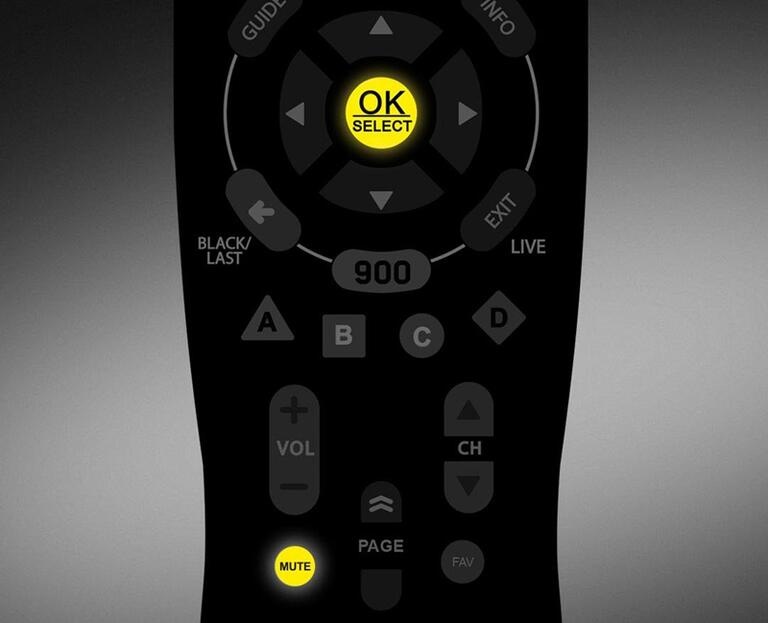
Quick programming by brand
Allows you to use the most popular code for your TV brand.
- Turn on your TV.
- Hold down OK/SELECT and MUTE until the TV button flashes red twice.
- Press TV once. The red light will stay lit.
- Point the remote control at the TV. Refer to the table below and enter the number corresponding to the brand of your TV (e.g., 2 for LG). The red light will flash twice, and the TV will turn off.
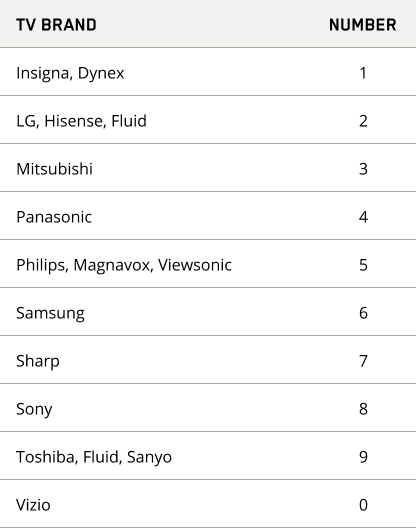
Note : If your TV is not in this list, refer to the automatic search method.
- If the TV turns off, try turning it on by pressing the TV button. If it turns on, programming is successful.
Programming by automatic search
This allows you to find a compatible programming code for your device from the list of codes in the remote control.
- Turn on the device to be programmed.
- Hold down OK/SELECT and MUTE until the TV button flashes red twice.
- Enter code 9, 9, 1. The TV button will flash red twice again.
- Press 1 to program a TV; press 3 for an audio system.
- Point the remote control at the device.
- Press the CH+ button several times, until the device turns off. This operation may take several minutes as all codes are tested one by one.
- When the device turns off, press OK/SELECT to lock the code.
- Press the TV button to check if your device turns on again.
Still need help?

Customer Service
For any questions about your account or invoice, or to modify or add services.
 1 877 512-8590
