
The Aruba 9004-LTE gateway
Superior-level network equipment for enhanced connectivity.
The Aruba 9004-LTE gateway is recommended for cases of complex Videotron Business Internet service bundles.
The Aruba 9004-LTE is offered at no extra cost in bundles that include options such as Automatic Backup Connection and Wi-Fi Pro. It is the most versatile router for local businesses.
 Business-grade router Automatic mobile backup connectivity Compatible with static IPsCompatible with the SD-WAN service Advanced control via HPE Aruba Networking Central

Continuous optimization
The smart, high-performance and secure Wi-Fi network is continuously optimized based on the people and devices connected to it, so you can enjoy an optimal connection at all times.

Centralized comprehensive management
The Helix Fi app allows you to manage your Wi-Fi network and the devices connected to it, even remotely. It also offers advanced security options to protect your network at all times.

Easy and fast installation
The Helix Fi gateway is installed in a few simple steps. This quick start guide enables you to make the most of your unlimited Internet right away.
Technical specifications of the Aruba 9004-LTE gateway
Width: 19.85 cm
Height: 3.82 cm
Depth: 15.31 cm
Weight: 1.143 kg
4 1 Gbps Ethernet ports (WAN/LAN)
1 Ethernet port (Console)
1 Micro-USB port (Console)
1 USB 3.0 Type A port (Console)
Power supply 12 V CC – 2.5 A
LTE category: 12
Certification: PTCRB
LTE-FDD: B1/B2/B3/B4/B5/B7/B8/B9/B12/B13/B14/B17/B18/B19/B20/B21/B25/B26/B28/B29/B30/B32/B66
LTE-TDD: B38/39/B40/B41
2 X SMA connectors for LTE (antennas included)
1 X SMA connector for GPS (antenna not included)
Bluetooth 5 BLE for IoT
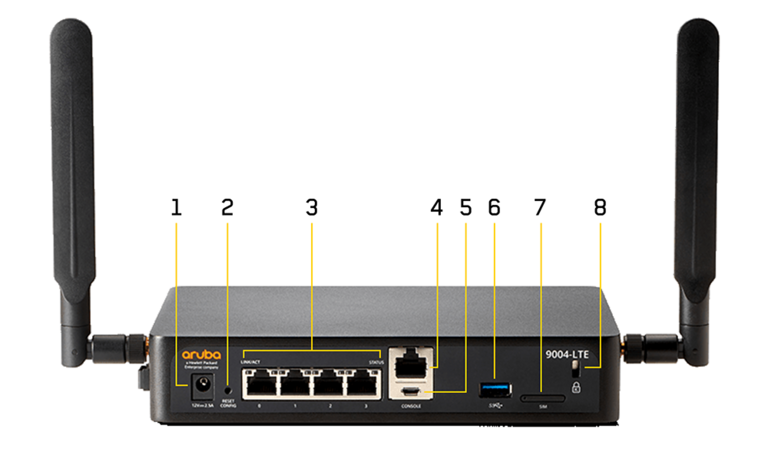
1. Electric power supply
Used to power the router with the power supply included.
2. Reset button
Resets the router’s factory settings.
3. Ethernet ports
Used to connect the primary WAN link from the model to other LAN network equipment.
4. RJ45 console port
Used to connect to the router’s settings directly from a computer, in Admin mode.
5. Micro USB console port
Used to connect to the router’s settings directly from supported equipment, in Admin mode.
6. 3.0 USB port
Used as a storage unit to save or install a configuration profile from the router.
7. SIM card slot
Used to insert the SIM card for the mobile backup service in the event that the signal from the modem (WAN) is lost.
8. Slot for Kensington lock
Secured the equipment in place (Kensington lock not included).
- Operating temperature: 0°C to 40°C
- Storage temperature: - 40°C to 70°C
- Humidity: 10% to 90%
Frequently Asked Questions
The Aruba 9004-LTE router is offered with complex service combinations that may include Wi-Fi Pro, backup over mobile network, static IPs, and Cloud communications, in order to ensure operations run smoothly.
No. The Aruba 9004-LTE router is not a Wi-Fi router. Subscription to the Wi-Fi Pro service is required to get a Wi-Fi signal from the HPE Aruba Access Points.
Yes. The HPE Aruba Networking Central platform allows you to configure all the features, settings, and notifications based on your business needs.
Browse our solutions
We're here to help



Conditions :
Where Videotron Business Internet technology and services are available.
HPE Aruba 9004-LTE gateway
Rental of the HPE Aruba 9004-LTE gateway is included for customers who subscribe and maintain their subscription to the Videotron Business Internet service and to the Automatic Backup Connection and Wi-Fi Pro options, or any other bundled deemed complex by Videotron Business. Equipment rental is subject to availability, and models may vary at the discretion of Videotron Business.