Good to know
You need to be subscribed to online billing for your invoices to appear in your history.
How to view your billing history
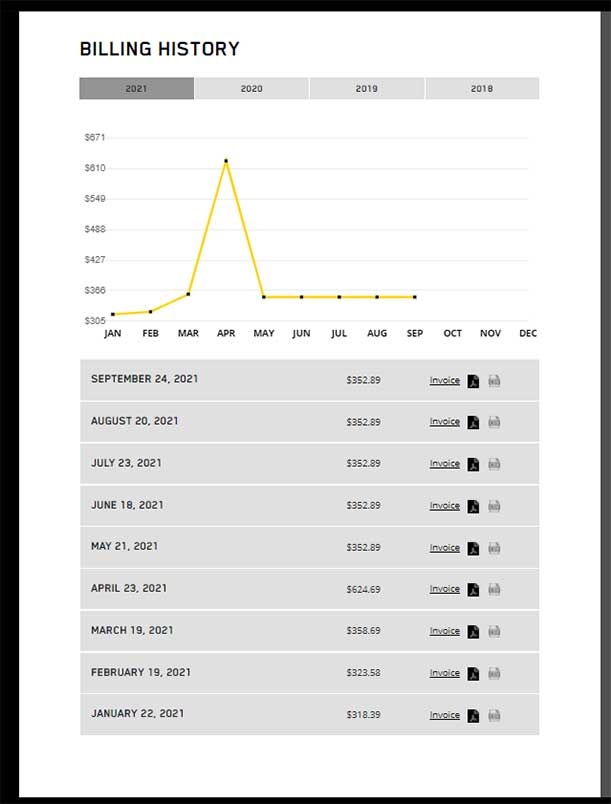
Log in to your Business Customer Centre. Here you will find your billing history for the past 36 months, from the moment when you signed up for online billing.
Here are the steps to follow in your Business Customer Centre:
- Log in to your Business Customer Centre.
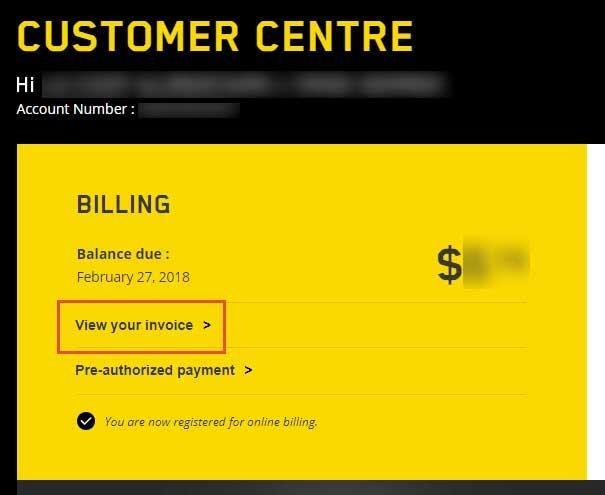
- In the Your Invoice section, click View Your Invoice.
- Go to the Billing History section at the bottom of the page to view your previous bills.
We recommend that you keep your invoices for a minimum of one year. That way, you can be sure to have them on hand as supporting evidence in the event of an invoicing error.
However, if you have an agreement covering a longer period, keep your invoices for the duration of said agreement.
Good to know
NOTE : For accounting and tax information, please visit official government websites and seek expert advice*.
* The details on this page are for information purposes only. Videotron does not advise on the possibility of obtaining an employer refund or a tax credit.
Need more help?

Customer Service
For any questions about your account or invoice, or to modify or add services.
 1 877 512-8590
