Sign up for online billing
- Log in to your Business Customer Centre.
- Select View your invoice.
- Enter your email address to sign up for online billing.
- Once you’ve sign up, you will no longer receive your bills by mail; they will only be available online.
Good to know
Your first online Business bill will be available on the date your next bill is issued, i.e., at the end of the current billing cycle.
Here’s how to access your online Business bill.
View my Business billing history
Your Business bills are saved for 36 months from the date you signed up for online billing. Before paying for your services, it’s important to locate your Business customer account number on your invoice, and associate it with the payment you wish to make.
Choose a preauthorized payment method for your Videotron Business bill
Are you worried you might forget to pay your Videotron bill on time? The Business Customer Centre allows you to set up preauthorized payments.
- Log in to your Business Customer Centre.
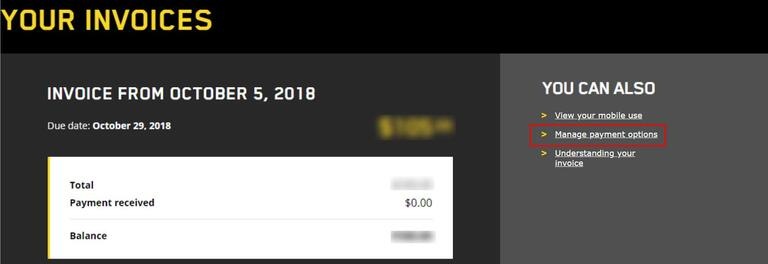
- Under the Account and Billing tab, under Your Invoice, select Manage payment options.
- Select the method of payment you want to use: bank withdrawal or automatic credit card charge.
Manage billing for multiple addresses
It is possible to subscribe to Videotron services at several commercial addresses. If that's the case, each address is a different account, and thus has a different Customer Centre account.
Here are some tips to make it easier to manage your services in each Customer Centre account:
- Assign a descriptive name to each Business Customer Centre account: HeadOffice, MtlOffice, Local202, etc.
- For each account, choose a password that you can easily remember.
- Sign up for online billing to receive bill notifications and payment reminders for each account.
- To make your online payments easier and avoid paying the wrong bill, make sure you match each payment to the right account number.
- Better yet, avoid any confusion by signing up for preauthorized payment by credit card or bank withdrawal.
Need more help?

Customer Service
For any questions about your account or invoice, or to modify or add services.
 1 877 512-8590
