How to get your Business invoice online
Good to know
You can sign up to get your online invoice in your Business Customer Centre, and you’ll get an email notification when it’s ready.
- Log in to your Business Customer Centre.
- Under Your Invoice, select Subscribe to Online Billing.
- Enter your email address and click Subscribe.
Important : Once you’ve signed up for online billing, you will no longer receive your Videotron invoice by mail. You’ll start receiving your online billing when the next invoice is issued, after the current billing period.
Accessing your Business invoice online
You can quickly and easily access your online billing in the Business Customer Centre and see your balance at a glance.
- Log in to your Business Customer Centre account.
- Under Invoice, you will see your account balance at a glance.
- Click See your invoice and then click View invoice to access, save or print your full invoice.
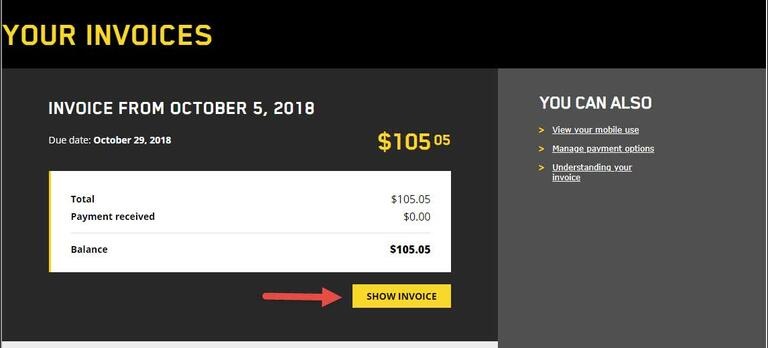
- To view your invoices from the past 36 months, see the Billing history section further down the page.
Good to know
You can check the balance of your last invoice, as well as the amount and date of your last payment, through Videotron’s automated services, accessible by telephone 24/7, at 1-866-380-2967.
Information about a payment becomes available within 24 hours of its processing. The time it takes to process your payments depends on the method of payment used.
Need more help?

Customer Service
For any questions about your account or invoice, or to modify or add services.
 1 877 512-8590
