Discover the meaning of the colour and blinking of the LED indicators on your Wi-Fi Pro access points, and get troubleshooting tips.

Select your equipment
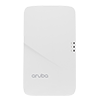
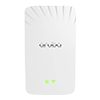
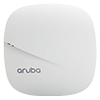
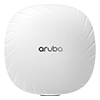
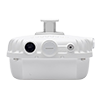
Wall-mounted access point, 303h model
System
System status: Indicates the operating status of the access point.

Green and solid
The device is ready and fully functional.

Green and blinking, on 1 second/off 1 second
The device has started but is not yet ready.

Green and blinking, on/off, repeating in under 1 second
The device is ready, uplink negotiated at a suboptimal speed (<1 Gbps).

Orange and solid
The device is ready and operating in power-saving mode (PoE source: 802.3af).

Orange and blinking
The access point is ready and operating in power-saving mode, with an uplink negotiated at a suboptimal speed (<1 Gbps).

Red and solid
Error

Wi-Fi
Wi-Fi radio operating mode.

Off
Both radios are turned off, or the device is turned off.

Green and solid
Both radio frequencies, 2.4 MHz and 5 MHz, are activated in access mode.
Green and blinking, on 1 second/off 1 second
One of the two radio frequencies is activated in access mode. One of the two radio frequencies is deactivated.
Orange and solid
Both radios are activated in monitor mode.
Orange and blinking
The device is ready and operating in power-saving mode, with an uplink negotiated at a suboptimal speed (<1 Gbps).
Alternating
Error

PoE-PSE
The indicator is located above the E3 port and signifies when the access point is operating as a Power Source Equipment (PSE), providing power over Ethernet (PoE) to an external device physically connected to the E3 Port via Ethernet cable.

Off
The access point is not providing PoE or is turned off.
Green and solid
The access point powers a connected device.
Green and blinking
The access point provides PoE power to a connected device.
Network (E1-E3)
The indicator next to ports E1-E3 signifies the activity transmitted to/from the port.

Off
Corresponds to one of the following situations:
- The device is turned off
- The port is disabled
- No link/activity

Green and solid
The link is established at maximum speed (1 Gbps)

Green and blinking
Activity is detected on a link at maximum speed.

Orange and solid
The link is established at a reduced speed (10/100 Mbps).

Orange and blinking
Activity is detected on a low-speed link.

Wall-mounted access point, 505h model
System

Green and blinking (1 second)
The device has started but is not yet ready.

Green and solid
The device is ready and functional. No network restrictions.

Green, mostly on, briefly off. Two-second cycle.
The device is ready and functional, suboptimal uplink speed (<1 Gbps).

Green, mostly off, briefly on. Two-second cycle.
The device is in deep sleep mode.

Orange and solid
The device is ready and operating in restricted power mode (IPM restrictions applied). No network restrictions.

Orange and blinking
The device is ready and operating in restricted power mode (IPM restrictions applied), suboptimal uplink speed (<1 Gbps).

Red
System error. Immediate attention required.

Wi-Fi

Off
The access point is turned off, or both radios are disabled.

Green and solid
Both radios are activated in access mode.

Green and blinking
One radio is activated in access mode, the other is deactivated.

Orange and solid
Both radios are activated in surveillance mode.

Orange and blinking
One radio is activated in surveillance mode, the other is deactivated.

Green and orange, alternating for one second. Two-second cycle.
Green: one radio in access mode. Orange: one radio in surveillance mode

Ceiling-mounted access point, 305 model
The 300 series access points have two LED indicators that signal the status of the device's system and radio.
System – LED indicator on the left

Green and blinking
The system is being started, not yet ready for use.

Green and solid
The device is ready for use. No restrictions.

Green and blinking rapidly
The indicator turns on and then briefly turns off every 2 seconds. The device is ready to use, uplink negotiated at a suboptimal speed (<1 Gbps).

Orange and solid
The device is ready and operating in power-saving mode (802.3af PoE).

Orange and blinking
The device is ready and operating in power-saving mode (802.3af PoE), uplink negotiated at a suboptimal speed (<1 Gbps).

Red
System error

Wi-Fi – LED indicator on the right

Off
The device is turned off, or both radios are disabled.
Green and solid
Both radios are activated in access mode.

Green and blinking
Blinking: a radio is activated in access mode.
Orange and solid
Both radios are activated in surveillance mode.
Orange and blinking
One radio is activated in surveillance mode.
Alternating
One radio is activated in access mode, the other in surveillance mode.

Ceiling-mounted access point, 505 model
System

Green and blinking, on 1 second/off 1 second
The device has started but is not yet ready.
Green and solid
The device is ready and functional. No network restrictions.
Green, mostly on, briefly off. Two-second cycle.
The device is ready and functional, suboptimal uplink speed (<1 Gbps).
Green, mostly off, briefly on. Two-second cycle.
The device is in deep sleep mode.
Orange and solid
The device is ready and operating in restricted power mode (IPM restrictions applied). No network restrictions.
Orange and blinking
The device is ready and operating in restricted power mode (IPM restrictions applied), suboptimal uplink speed (<1 Gbps).
Red
System error. Immediate attention required.
Wi-Fi

Off
The access point is turned off, or both radios are disabled.
Green and solid
Both radios are activated in access mode.
Green and blinking
One radio is activated in access mode, the other is deactivated.
Orange and solid
Both radios are activated in surveillance mode.
Orange and blinking
One radio is activated in surveillance mode, the other is deactivated.
Green and orange, alternating for one second. Two-second cycle.
Green: one radio in access mode. Orange: one radio in surveillance mode
Outdoor access points, 300 and 500 series
The 300 and 500 series outdoor access points are equipped with a single LED indicator that signals the system status of the unit.
System

Red and solid
(300) - Initial power-up.
(500) – The indicator blinks for a few seconds at startup. If it stays on, it means there's a problem.

Green and blinking
The device has started but is not yet ready.

Green and solid
The device is ready and functional. No network restrictions. The LED indicator will turn off after 5 minutes (500) or 1,200 seconds (300).

Green and yellow, alternating (300 model)
The access point is ready and the 10/100 Mbps Ethernet link is established. The LED indicator will turn off after 1,200 seconds.

Green and orange, alternating (500 model)
The device is ready and functional, suboptimal uplink speed (<1 Gbps). The LED indicator will turn off after 5 minutes.

Red and blinking every 3 seconds
This means that there is a problem with radio 0 (5 GHz).

Red and blinking twice every 3 seconds
The indicator quickly turns off for 0.5 seconds every 3 seconds. This means that there is a problem with radio 1 (2.4 GHz).

Not yet subscribed to Wi-Fi Pro?
Take advantage of extended coverage and increased business intelligence now. Discover Wi-Fi Pro
Still need help?

Customer Service
For any questions about your account or invoice, or to modify or add services.
 1 877 512-8590
