Understanding your two platforms
Why two platforms?
We now use a unique identifier (your email address) to log in to Videotron. However, during the transition period, some of your services may still appear under two different platforms. We are currently working to progressively gather all services under My Account.
Depending on the type of services you have, you may therefore use one or the other of the platforms below.
My Account

My Account gathers all your Helix services:
- Helix Internet
- Helix TV
- Helix TV App
My Account can also include your Mobile services, if they have been transferred from the Customer Centre.
Eventually, all Videotron services will be grouped in My Account to simplify your management.
Customer Centre

The Customer Centre gathers certain Residential and Mobile services, such as:
- Your Mobile services (for certain customers)
- Your illico TV services
- Your non-Helix Home Internet services
- Your Home Phone services
Depending on your situation, some of your services may be under My Account, and others in the Customer Centre.
In which cases am I redirected to one platform or the other?
The log in screen is the same for My Account and the Customer Centre. After entering your identifiers, we will automatically direct you to the platform associated with your services.
- If you have Helix services (Helix Internet, Helix TV): you will be directed to My Account.
- If you only have services that are still under the Customer Centre: you will be directed to the Customer Centre.
- If you have non-Helix Residential services (illico TV, Residential Internet, Telephony): you will be directed to the Customer Centre.
- If you use different identifiers depending on your services, the platform will change based on the identifier entered.
- If you do not have any services under My Account, you will be directed to the Customer Centre.
You only need to log in once: the system will take you to the platform associated with your services.
How to see all your services?
If you are connected to My Account and do not see certain services (e.g. your Mobile invoice or non-Helix Residential services), use one of the following buttons to automatically access the Customer Centre without having to log in again.

This button appears when some of your invoices or services are under the Customer Centre.
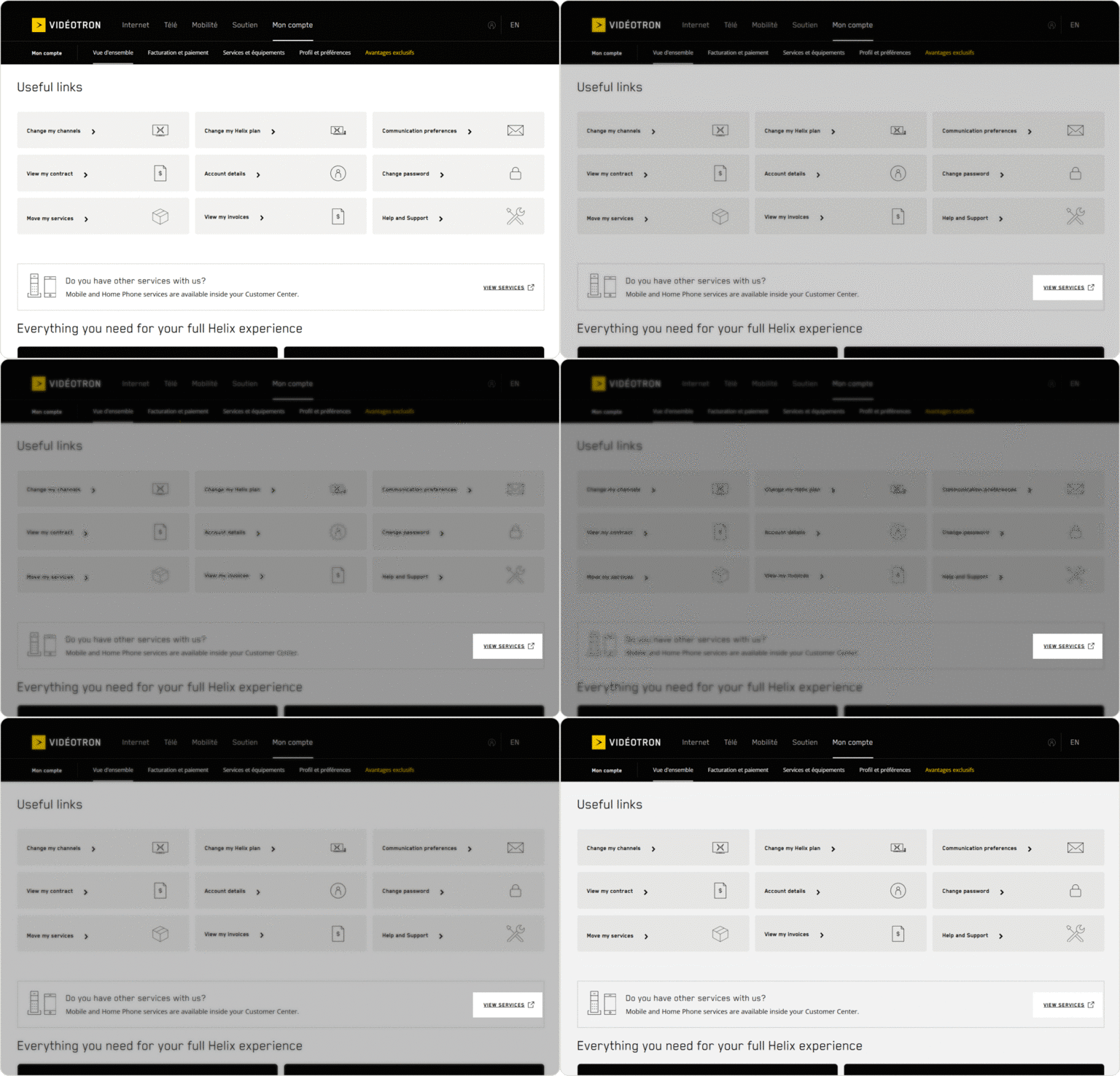
This button appears in the Useful links section. It also allows you to access the Customer Centre if certain services are under this platform.
It doesn’t matter which button is displayed—both lead to the Customer Centre.
Quick access
Choose what you want to do. We will first redirect you to the log in screen, then to the platform associated with your services.
Viewing my invoice
Your invoice may be under My Account or the Customer Centre, depending on your services.
Managing my Mobile services
Your Mobile services can be found under My Account or the Customer Centre, depending on your situation.
Managing my Helix services
To manage your Helix Internet and Helix TV services, you will be taken to My Account.
Signing up for our self-serve platforms
Depending on your services, your online registration could be under My Account or the Customer Centre.
My Account
When you subscribe, an email is sent to you to complete your registration. Didn't receive this email? Please contact us.
Once you register for My Account, those login credentials will become your credentials for the Customer Centre as well. One less thing to remember!
Customer Centre
To register for the Customer Centre, the account holder must fill out the registration form and create a password. Check out our tips on creating a strong password.
Getting an error message?
Try our quick fixes to solve the problem on a web browser or mobile app.
If you still can’t log in, contact us.
Frequently Asked Questions about online account access
- Clear your browser or your app cache and try again to log in.
- Reset your password, then try logging in again.
- Call our Customer Service.
The link to the login page is in the top right corner of our site.
You may already be logged in. If you see your name at the top right of the page, click on it to access your account.
- Go to the login screen and try to connect.
- Clear your browsing history and try again to log in.
- Try using a different browser.
- Reset your password, then try logging in again.
- Call our Customer Service.
My Account
All your addresses are in the same account space. To view address information, select the location from the drop-down menu at the top left of the account overview page. Note, however, that since each address has a different account number, payments must be made separately.
Customer Centre
You’ll need to create a Customer Centre account for each address. Choose a descriptive username for each account (e.g., House, Cottage, Condo, etc.).
Do you have multiple accounts? Read our tips on managing your invoices.
Adding a user: In the Customer Centre, the account holder must go to the Manage account users section and add a user.
Editing or deleting a secondary user: In the Customer Centre, the account holder must go to the Manage account users section and click the View button beside that user. From there, they will be able to modify the user’s information and authorizations or delete the user.
Secondary users cannot be added to My Account.
Use your Customer Centre login information.
To download the app, your mobile device must be running on Android 5 or later, or iOS 12.4 or later.
No, not at the moment. For quick access to My Account from a cell phone, please bookmark the login link or click on SIGN IN  in the top right-hand corner.
To reset your password, log in to your Customer Centre and follow these steps.
If your account is linked to a messaging app on a phone or computer (Outlook, Gmail, Mail, etc.), you need to update your password in the app’s parameters after it has been modified.
My Account
My Account includes Helix services: Helix Internet, Helix TV, and Helix TV App. Our goal is to migrate all our services to this user-friendly platform.
Customer Centre
The Customer Centre includes the Mobility, illico TV, Hybrid Fibre Internet and Home Phone services. You may be subscribed to some of these services in addition to Helix services which appear in My Account.
We started using My Account when we launched Helix. Our goal is to migrate all our services to that platform. In the meantime, you may have to manage some of your services in My Account and others in the Customer Centre, even if these platforms are accessed from the same login screen.
We started using My Account when we launched Helix. Our goal is to migrate all our services to that platform. In the meantime, you may have to manage some of your services in My Account and others in the Customer Centre, even if these platforms are accessed from the same login screen.


